How to Film Your Child's Sports Games Automatically: A Parent's Guide [2026]
Veo

How to film your child's sports games automatically without missing a moment. Veo Go vs Veo Cam 3, three parent scenarios, budget guide, and how to share footage with family.
Most sports camera guides are written for coaches and club administrators. This one is not. If you are a parent who wants to film your child's games automatically, stop standing on the sideline holding your phone for 90 minutes, and actually watch the game instead, this guide is for you. It covers the two Veo products that make automatic filming accessible for families, and gives you specific recommendations based on your situation.
It covers the two Veo products most relevant to parents and youth programs, how the setup works in practice, what the footage is actually for, and three common family and club scenarios with specific recommendations for each. If you want to understand the full range of Veo's sports camera options first, see the complete guide to recording youth sports.
Veo Go: the sports camera built for parents
Uses the iPhone you already have. Set up in under 2 minutes. Record your child's first goal and every game that follows automatically.
.jpg)
The two products to know: Veo Go and Veo Cam 3
Veo makes two automatic sports cameras. Understanding the difference between them is the first step to choosing the right one.
Veo Go: for parents and individual coaches
Veo Go turns a compatible iPhone into an automatic sports camera. Mount the phone on a tripod, open the Veo app, press record, and walk away. The AI tracks the game automatically and delivers full-field footage plus a tracked follow-cam view after the game uploads.
Veo Go is the right choice for parents who want to film their child's games without standing on the sideline holding a phone. It is also the choice for individual coaches and travel team managers who want professional-quality footage without a significant hardware investment. Because it uses the iPhone you already own, the cost is lower than buying a standalone camera.
- Best for: Parents filming one child, travel team managers, individual coaches, families aged 6 to 12 who want to capture memories and build a footage library.
- Hardware: Compatible iPhone (iPhone 11 or newer) + Veo tripod.
- Price: $ (most accessible entry point into automatic sports recording)
Veo Cam 3: for clubs and multi-team programs
Veo Cam 3 is a standalone camera that operates independently of a phone. It mounts on a tripod, connects to the Veo app via Bluetooth, and records automatically. Battery life covers a 90-minute match with margin. The camera records at 4K 60fps and delivers both a full-field panoramic view and an AI-tracked follow-cam.
Veo Cam 3 is designed for clubs that film multiple teams across a full season. A single camera can cover one pitch per session and builds a complete library for every player across all age groups. For clubs running U10, U12, and U14 teams simultaneously, multiple Veo Cam 3 units can be deployed on different pitches with no operator requirement.
- Best for: Clubs with multiple age groups, high school programs, coaches who film both matches and training regularly.
- Hardware: Standalone Veo Cam 3 device + tripod. No phone required during recording.
- Price: $$ (hardware purchase plus subscription)
Three common scenarios with specific recommendations
Scenario 1: One child on a travel team
Your child plays on a travel soccer, lacrosse, or basketball team. Games are at different venues every week. You want to film every game, share highlights with grandparents, and build a library of footage for recruiting when the time comes. You do not want to stand on the sideline holding your phone for 90 minutes.
- Recommended product: Veo Go.
- Why: Lower cost, uses your iPhone, sets up in 2 minutes at any venue. The footage quality and platform are equivalent to Veo Cam 3 for this use case.
- Setup: Bring the Veo tripod to every game. Mount the iPhones, open the app, press record, and go watch the game. Upload automatically when you get home.
- Subscription: Individual plan. Covers one user with access to the full Veo platform.
- What you get: Every game filmed automatically. Full-field footage plus tracked highlights. Share clips directly with your child, their coach, and family. Build a two to four year library for recruiting.
Scenario 2: Siblings on multiple teams
You have two or three children playing in different age groups, sometimes at different venues on the same day. You want to film all of them without needing a separate camera operator at each game, and you want the footage in one place so both children can access their own clips.
- Recommended product: Two Veo Go setups, or one Veo Go and one Veo Cam 3 for the team that plays most frequently.
- Why: Each setup runs independently. No operator needed at either venue. Footage from both children uploads to the same Veo account and is accessible from a single app.
- Setup: Each has a tripod and a compatible phone (or one of the setups uses a Veo Cam 3 standalone). Each parent starts the recording before kick-off at their respective venue.
- Subscription: Family or multi-user plan. Check the current pricing for the option that covers multiple devices under one account.
- What you get: Both children's seasons filmed automatically. Separate footage libraries per child. Share highlights across the family without managing separate accounts.
Scenario 3: A small volunteer-run club
You run or manage a small community club with three to five teams. Everything runs on volunteer time. Coaches are parents who show up on Saturday mornings. You want to film games without adding to anyone's responsibilities, and you want the footage to be useful for the coaches who do use it for player development.
- Recommended product: One or two Veo Cam 3 units, one per pitch.
- Why: Veo Cam 3 does not require a phone during recording. Any volunteer can set it up and walk away. The camera runs unattended for the full game. No one needs to be designated as a camera operator.
- Setup: Assign setup responsibility to one person per pitch. The setup takes 2 minutes: extend the tripod, mount the camera, connect the app, press record. The same volunteer stops recording after the final whistle and connects to Wi-Fi.
- Subscription: Club plan. Covers all coaches and players at the club under a shared account.
- What you get: Every game filmed with zero operational burden on coaches. Footage accessible to all coaches and players. Parents can watch games their child was in. Coaches who want to use footage for development can do so without asking anyone to film specially for them.
Parent vs. coach: what to consider
Budget guide: which setup fits your situation
Veo products range from an entry-level setup that uses a phone you already own to a multi-camera club configuration with live streaming. Here is a simple overview of the three common setups:
Pricing for all Veo products and subscriptions is available on the website. The cost levels above reflect the relative investment required, not fixed prices, as plans and hardware pricing vary by region and subscription length.
What happens to the footage
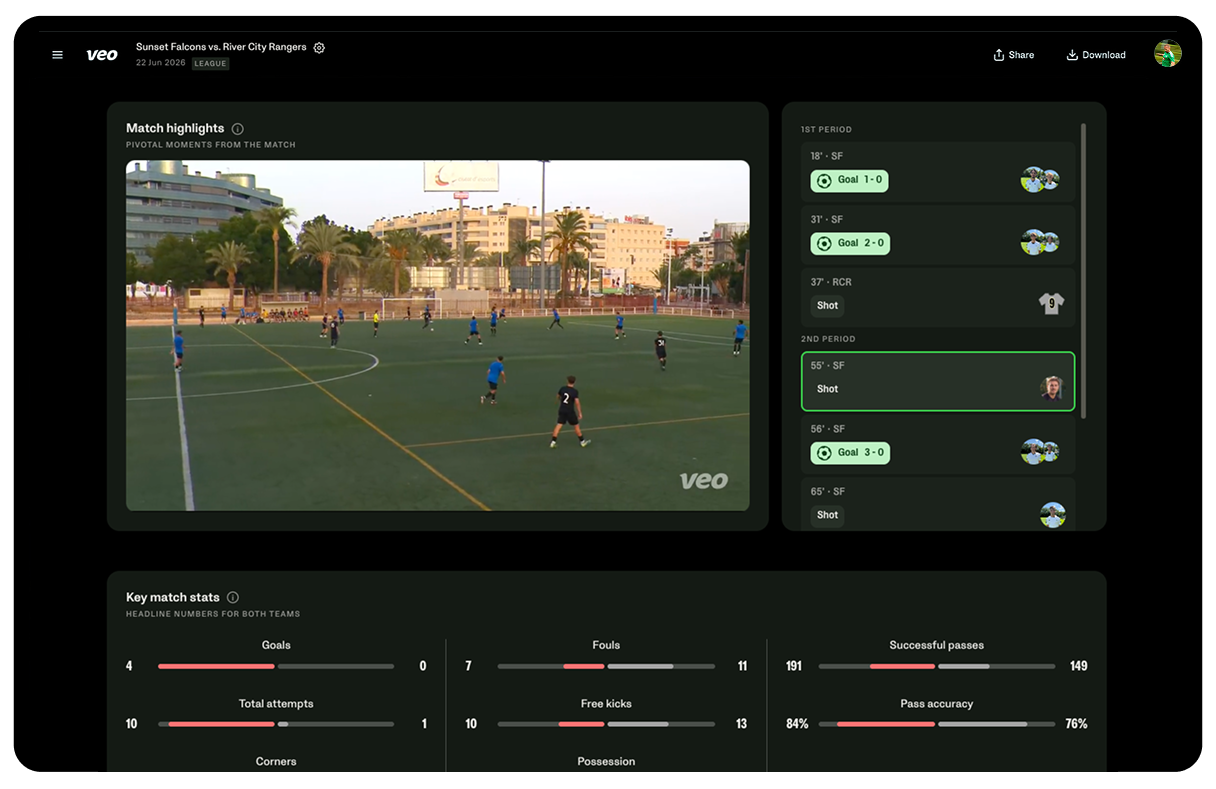
After each game, the camera connects to Wi-Fi and uploads the footage automatically. Within a few hours, two views are available in the Veo app:
- Full-field panoramic view. The complete recording of the full pitch from the halfway line. Shows team positioning, runs, and the full context of every play.
- Tracked follow-cam view. An AI-generated view that follows the ball and main action. Looks like broadcast-style footage. Better for highlights and individual player clips.
Parents most commonly use the tracked follow-cam view for sharing clips and building highlight reels. Coaches use the panoramic view for tactical analysis and the tracked view for individual player development conversations.
Both views are accessible on desktop and mobile. Footage is shareable via a direct link that plays in any browser. No downloading, no file management, no format issues.
How to get started
The fastest way to get started is to order Veo Go if you are a parent filming one child, or Veo Cam 3 if you are managing a club or multi-team program. Both set up in under 2 minutes at any venue.
- Get started with Veo Go for parents and individual coaches
- Get started with Veo Cam 3 for clubs and multi-team programs

FAQs
Veo Go requires a compatible iPhone to operate. Veo Cam 3 is a standalone device that works independently of any phone. For a club running multiple teams simultaneously, Veo Cam 3 is more practical because it does not require a dedicated phone at each pitch. For a single team or a parent buying individually, Veo Go delivers equivalent footage and platform at lower cost.
Yes. The setup process is three steps: mount the phone on the tripod, connect via Bluetooth in the Veo app, and press record. The camera tracks automatically from that point. No calibration, no settings to adjust, no operator needed during the game. Most parents set it up for the first time in under 5 minutes.
Veo Go has the lowest entry cost of any Veo product because it requires no standalone hardware beyond a compatible iPhone and a Veo tripod. Subscription pricing is available at veo.com. For families with multiple children playing on different teams, Veo offers multi-user plans that cover more than one device under a single account.
Veo Go is the best choice for parents. It uses a compatible iPhone mounted on a tripod and records automatically without anyone operating it during the game. The cost is lower than Veo Cam 3 because it uses a phone you already own. The footage quality and coaching platform are equivalent. For parents filming one or two children across different venues, Veo Go is the most practical and cost-effective option.
Yes. The Veo platform includes clip creation tools that let you trim any section of the footage and share a direct link to that specific clip. A parent who wants to send a grandparent just their child's goal can clip those 30 seconds and share a link that plays only that moment. Coaches use the same feature to share individual player feedback clips before practice.
Footage uploads automatically when the camera connects to Wi-Fi after the game. Most footage is available within one to three hours of upload, depending on the length of the recording and connection speed. Once processed, both the full-field panoramic view and the AI-tracked follow-cam are available simultaneously in the Veo app.
Yes. When a parent films with Veo Go, the footage uploads to their Veo account and can be shared directly with coaches via a link. The coach does not need a Veo account to view the shared footage. For clubs where multiple users need ongoing access to footage from multiple sessions, a club account with shared access is more practical than individual parent sharing.
Veo footage is shareable via a direct link that plays in any browser. No app download required for viewers. Share the link by text, email, or messaging app. Viewers can watch the full game or a specific clip without creating a Veo account. Parents regularly share game links with family members who could not attend in person.


.jpeg)